An AWS cloud migration can improve the ability to grow the ability to keep running, and access to cloud services that are taken care of. Moving workloads without enough discovery can cause downtime, unexpected costs and operational risk. A successful migration begins with business priorities, application dependencies and recovery requirements—not with moving servers. Every migration needs a destination, a clear migration path and a measurable outcome.
The objective is not simply to migrate to AWS. It is to move without weakening security, interrupting operations or carrying unnecessary technical debt into the new environment.
What Does Moving to AWS Involve?
AWS cloud migration is the process of moving apps, data, databases and infrastructure from on‑premises systems, hosting environments or another cloud to Amazon Web Services. AWS cloud migration may also involve updating work processes to use managed, serverless, cloud‑native services.
What Can Businesses Migrate?
Enterprises can move machines, applications, databases, file systems and analytics workloads, as well as recovery environments. Some of these can be moved with little change; other ones need to be completely redesigned. Applications without sufficient value may be retired, while workloads constrained by regulation, latency or hardware may remain where they are.
Why Enterprises Move to AWS
Common goals are about fixing equipment making things stronger and getting help, from managed services. These results need design and proper control.
Why Do AWS Migrations Fail or Cost More?
Migration problems often begin before the first workload moves. An incomplete inventory can hide integrations, scheduled jobs, authentication dependencies and downstream consumers.
Incomplete Assessment
A cloud migration assessment should identify applications, infrastructure, owners, utilization, data flows and dependencies. It should also establish performance baselines. Without this evidence, teams may move unused systems or discover critical dependencies during cutover.
Weak Security, Cost and Continuity Planning
Security and financial controls should be designed before workloads arrive. Identity, network segmentation, encryption, logging, tagging and budget ownership require clear standards. Teams must also define RTO and RPO requirements because they influence replication, backup and cutover decisions.
Inadequate Testing and Rollback Preparation
A migration plan must define functional, performance, integration, security and data testing. High-impact workloads require rehearsed cutovers, named decision-makers and measurable rollback triggers.
Build the Right AWS Migration Strategy
An effective AWS migration strategy connects business outcomes with technical decisions. Define why each workload is moving, such as reducing infrastructure risk, improving delivery or enabling modernization.
Group workloads by criticality, complexity, dependencies and readiness. Applications with limited dependencies and strong tests may be suitable pilots. Highly connected systems require deeper preparation.
Organize related workloads into migration waves. Each wave needs owners, entry criteria, tests, a cutover plan and an approved rollback path.
Measure availability, deployment time, performance, incidents, recovery and cost against forecast.
Choose the Right Path With the 7 Rs
AWS defines seven migration strategies. The right path should be selected for each workload rather than applied to the entire portfolio.
| Strategy | Approach | Appropriate when |
| Rehost | Move with minimal application changes | Speed and limited disruption are priorities |
| Relocate | Move an existing environment without redesigning it | The current platform has a compatible AWS destination |
| Replatform | Make targeted cloud optimizations | Managed services can add value without a full rewrite |
| Refactor | Redesign for cloud-native capabilities | Business value justifies greater complexity and change |
| Repurchase | Replace the application with another product | A commercial or SaaS solution better fits the need |
| Retain | Keep the workload in its current environment | Migration is not yet justified or feasible |
| Retire | Decommission the workload | It no longer provides sufficient business value |
AWS Prescriptive Guidance notes that refactoring is the most complex option and may be unsuitable during a large migration. In some programs, moving first and modernizing later creates a more manageable risk profile.
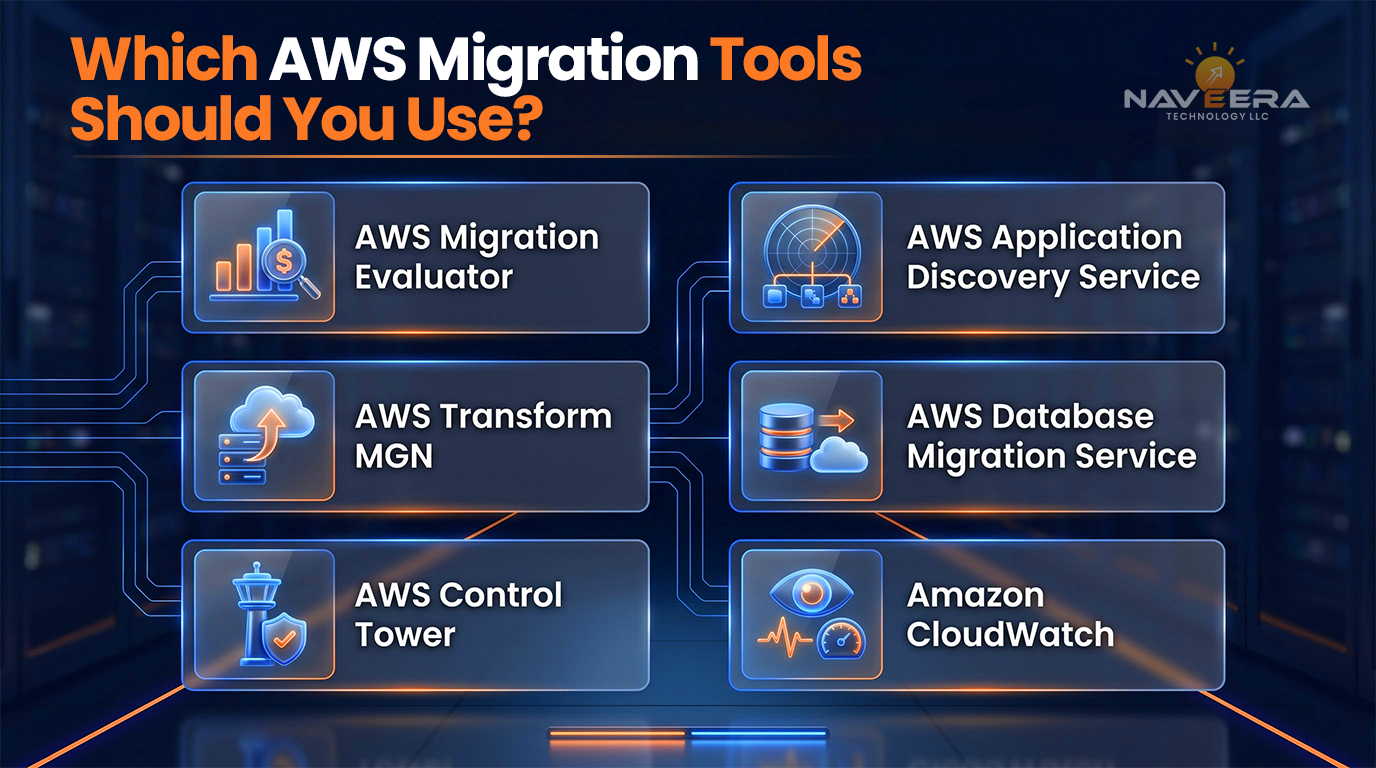
Which AWS Migration Tools Should You Use?
Different AWS migration tools address different stages. Selection should follow the assessment and migration path.
- AWS Migration Evaluator helps with discovery and business-case development by using data about infrastructure and how it’s being used.
- AWS Application Discovery Service gathers details about on-premises servers and the connections between them.
- AWS Transform MGN, which was previously called AWS Application Migration Service, enables rehosting of virtual and cloud-based servers. It uses block-level replication and coordinated cutover to move workloads.
- AWS Database Migration Service supports moving databases and data stores including replication, for supported sources and targets.
- AWS Control Tower makes it easier to set up and manage a multi-account AWS environment.
- Amazon CloudWatch provides monitoring, metrics, logs and operational visibility after migration is complete.
AWS confirms the new name on the official AWS Transform MGN page.
Follow a Controlled Migration Process
A controlled AWS cloud migration can be organized into three phases.
Assess and Design
Inventory workloads, map dependencies and establish baselines. Build the business case, assign an R strategy and design a landing zone covering accounts, identity, networking, logging and governance.
Pilot and Migrate in Waves
Run a representative pilot to validate the method, procedures and responsibilities. Use its findings to improve automation and wave planning. During each wave, replicate data, validate the target and confirm readiness before cutover.
Cut Over, Validate and Optimize
At cutover, confirm synchronization, functionality, integrations, security and access. Monitor business transactions and activate rollback if thresholds are missed. After stabilization, right-size resources, remove temporary infrastructure and review costs.
Reduce Downtime, Risk and Cloud Cost
Reduce downtime through incremental replication, rehearsed cutovers and migration windows aligned with business activity. The approach depends on architecture and recovery requirements.
For an AWS database migration, assess source and target compatibility, schema conversion and validation requirements. AWS Database Migration Service can move supported databases while source systems remain operational, but teams must validate accuracy and application compatibility. See the AWS DMS overview.
Apply least-privilege access, encryption, network boundaries, centralized logging, backups and tested recovery. Map regulatory requirements to the architecture.
Before cutover, model migration and operating costs, right-size resources, retire unused systems and apply cost-allocation tags. FinOps should connect consumption with business ownership.
Use an AWS Migration Readiness Scorecard
Before approving a workload, evaluate six readiness areas:
| Area | Decision question |
| Business | Is there a measurable reason to migrate? |
| Application | Are the architecture, owners and dependencies understood? |
| Data | Are volume, sensitivity, quality and movement requirements known? |
| Infrastructure | Is the target environment designed and tested? |
| Security | Are access, encryption, logging and compliance controls defined? |
| Operations | Are monitoring, support, recovery and cost ownership ready? |
A low score should create a remediation action and accountable owner before the workload enters a migration wave.
How Naveera Technology Supports AWS Migration
Naveera Technology provides AWS cloud migration services covering readiness assessment, dependency mapping, architecture planning, application and database migration, security validation, cutover preparation and post-migration optimization.
Our IT infrastructure services support cloud architecture, landing-zone preparation and operational readiness. For applications that require modification before or during migration, our application development services can support modernization and integration requirements.
Naveera’s data engineering services address database migration, data pipelines, validation and data-platform requirements surrounding the transition.
Every engagement should begin with evidence: which workloads should move, why they should move, how risks will be controlled and how success will be measured.
Final Takeaway: Migrate With Control
Enterprises should not treat migration as a bulk infrastructure transfer. A successful program links business goals to decisions about workloads, creates a place to land data moves, moves in small steps and checks each switch carefully.
When companies look at what they need, choose the way to move and plan for safety, recovery and managing money from the beginning, they can move to AWS with fewer problems and a better way to get long-term benefits.
FAQ
What is AWS cloud migration?
AWS cloud migration moves applications, databases, data or infrastructure from on-premises systems or another environment to AWS. It can involve rehosting existing workloads or modernizing them with managed and cloud-native services.
What are the main migration steps?
Begin with a cloud migration assessment, build the business case, select an R strategy, design the landing zone, pilot the approach, migrate in waves, validate cutover and optimize the environment.
What are the 7 Rs of migration?
The seven AWS strategies are rehost, relocate, replatform, refactor or re-architect, repurchase, retain and retire. The appropriate AWS migration strategy should be selected separately for each workload.
Which AWS migration service should a business use?
The appropriate AWS migration service depends on the asset and migration path. Server rehosting may use AWS Transform MGN, while supported database migrations may use AWS DMS.
What is AWS Application Migration Service?
AWS Application Migration Service is the former name of AWS Transform MGN, AWS’s rehosting capability for converting supported source servers into native Amazon EC2 instances.
What is AWS Database Migration Service?
As an AWS data migration service, AWS Database Migration Service helps move supported databases and data stores to AWS or, between supported environments, including replication options that can help limit downtime.
How much does migration cost?
Cost depends on workload volume, complexity, migration strategy, data transfer, tooling, testing, target architecture and required support. A business should create a workload-specific total-cost model before migration.
How can businesses reduce migration downtime?
Use dependency mapping, incremental replication, production-like testing, rehearsed cutovers and documented rollback procedures aligned with business RTO and RPO requirements.